




Breakfast Greek yogurt parfait 510 kcal
Lunch Soba noodle salad 620 kcal
 Dinner Crispy glazed chicken with sesame rice 820 kcal
Snack Edamame 100 kcal
Planned 2,050 kcal
Nutrinity for iPhone
Answer questions about how you eat and cook. Nutrinity plans 14 days of meals, then writes the grocery list for the store you pick.
Answer questions about how you eat. You get 14 days of meals and the list to buy them.
Hi, Alex!
Dinner is next. Yum! Herby salmon on Friday.
October 2026
Today’s mealsMeals for Friday20 of 4 eaten
This is an example plan for someone holding their weight who has 25 minutes to cook on weeknights, leans Japanese and Mexican, and skips mushrooms. Yours will look different.
Breakfast Greek yogurt parfait 510 kcal
Lunch Soba noodle salad 620 kcal
Dinner Crispy glazed chicken with sesame rice 820 kcal
Snack Edamame 100 kcal
Planned 2,050 kcal
Breakfast Berry overnight oats 420 kcal
Lunch Lemon chicken grain bowl 560 kcal
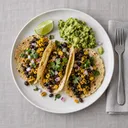 Dinner Bean and corn tacos with guacamole 720 kcal
Snack Apple and peanut butter 330 kcal
Planned 2,030 kcal
Breakfast Egg and spinach breakfast tacos 420 kcal
Lunch Chicken tortilla soup 630 kcal
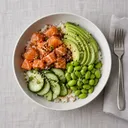 Dinner Salmon poke bowl with avocado and edamame 820 kcal
Snack Greek yogurt with honey 280 kcal
Planned 2,150 kcal
Breakfast Berry overnight oats 420 kcal
Lunch Soba noodle salad 620 kcal
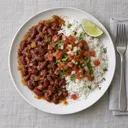 Dinner Red beans and rice with pico de gallo 730 kcal
Snack Orange and almonds 250 kcal
Planned 2,020 kcal
Breakfast Berry overnight oats 420 kcal
Lunch Lemon chicken grain bowl 560 kcal
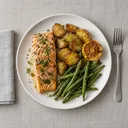 Dinner Herby salmon with potatoes and green beans 710 kcal
Snack Apple and almond yogurt 340 kcal
Planned 2,030 kcal
Breakfast Huevos rancheros 570 kcal
Lunch Miso soup with rice and tofu 540 kcal
 Dinner Grilled quesadilla with cilantro and crema 660 kcal
Snack Orange and almonds 250 kcal
Planned 2,020 kcal
Breakfast Greek yogurt parfait 510 kcal
Lunch Chicken tortilla soup 630 kcal
 Dinner Pan-fried gyoza with scallions 540 kcal
Snack Apple and peanut butter 330 kcal
Planned 2,010 kcal
Pick a day to see its nutrition, meal by meal.
What this example day adds up to, meal by meal.
Goal 2,100 kcal
2,030 kcal planned
70 kcal left under the goal.Right on the 2,100 kcal goal.
 Breakfast Berry overnight oats Lunch Lemon chicken grain bowl Dinner Herby salmon with potatoes and green beans Snack Apple and almond yogurt
 Share of the calories from protein, carbs and fat.
Share of the Daily Value. The line marks 100%.
Aim to reach
Aim to stay under
Photos show the kinds of meals Nutrinity plans. In the app every meal has its own photo, calories, macros, ingredients and steps.
The example week, in the app’s own screens. Tap a day, open a meal and cook it, then tick off the groceries. Nothing you do here leaves this page.
This is a demo, a simplified version of the app. Features and looks differ from the real thing, and some things are left out. The stores, prices and pantry are made up: in the app you pick real stores near you, the grocery total is an estimate, and the pantry is your own. Recipe nutrition is computed from USDA FoodData Central.
0 of 5 tried

Demo, a simplified version of the app
You answer the setup questions once. The app builds the plan from those answers, and Pal, the cat, keeps you company.
Lose weight, build muscle or hold steady. Then your height, weight, age and how active you are. Your daily targets come from these answers.

Pick the cuisines you like, the foods you skip and any restrictions. Choose how many meals a day and whether meals can repeat.

Tell it what equipment you have and how long you can cook on weekdays and weekends. Set a budget per meal and pick a grocery store near you.

You get 14 days of meals. Each one has a photo, calories, macros, ingredients and steps. Swap today’s meal for another; other days are view-only.

This is Friday’s herby salmon in four steps. Each step lists the ingredients it uses and has a timer when it needs one. Swipe the card or tap Next step to move on.

Heat the oven to 425°F (220°C). Toss potatoes and green beans with olive oil, salt and pepper.
You’ll use
Step 1 of 4
Mark a meal as eaten and its calories and macros count toward your day.


The bars compare what you ate with what was planned and with your goal.
The list is grouped by store with an estimated total. What is already in your pantry stays off it.
0 of 32
Estimated total $112.25
Dinners on the list
7 of 7 dinners
Sample stores
Sample prices for this example week. In the app the total is an estimate for the store you pick.
No dinners on the list. Tap a day to add it back.
Already in your pantry
Tap what you already have. It leaves the list, like the pantry in the app.

Search near your ZIP code, address or location, then pick the store you shop at.
Premium includes everything below. New subscribers, if eligible, can try the yearly plan free for 7 days.
Try 7 days free, then $39.99 every year, for new subscribers if eligible.
Renews automatically at $39.99 every year unless canceled at least 24 hours before renewal. Billed to your Apple ID. Manage or cancel in your Apple ID settings. To cancel, open Settings on your iPhone, tap your name, then Subscriptions, and choose Nutrinity, at least 24 hours before renewal. The 7-day free trial is for new subscribers, if eligible, and applies to the yearly plan only. Try 7 days free, then $39.99 a year. Cancel anytime in your Apple ID settings at least 24 hours before the trial ends.
Nutrinity is free to download. Nutrinity Premium is a subscription: $39.99 a year or $5.99 a month. New subscribers to Nutrinity Premium, if eligible, can try the yearly plan free for 7 days, then $39.99 a year. The Premium section on the home page lists what it includes. What Premium includes
You can swap today’s meals; other days are view-only. Tap a meal to see other options, each with its calories and protein, and how the calories would change.
The app searches for grocery stores near your ZIP code, address or current location, within a radius you set. You pick a main store and can add a backup. The list shows an estimated total. Prices may vary in store.
Setup asks how you like to eat, your dietary restrictions and the foods you skip, including allergies, and Nutrinity filters recipes and products by what you list. Dairy means cow’s milk and other animal dairy; plant milks are fine. Gluten-free labeled products are allowed for a gluten allergy. Nutrinity is a planning tool, not medical advice. Always check product labels for your allergens; if you have a severe allergy, talk to your doctor.
Add it to your pantry. The pantry holds what you already have, so it stays off the shopping list and is not bought again.
Nutrinity runs on iPhone with iOS 17 or later. There is no Android or web app.
Subscriptions are handled by Apple. On your iPhone open Settings, tap your name, then Subscriptions, and choose Nutrinity. Deleting the app doesn’t cancel a subscription.
More answers in the full FAQ. See pricing, or how Nutrinity compares with other AI meal planners.